
Coding for children, from Year 1
Kiddo Tutor teaches programming from zero, in a language made for children called Kiddo Code. Every program is run to see if it works, so the child sees their code move, paint and fix itself.
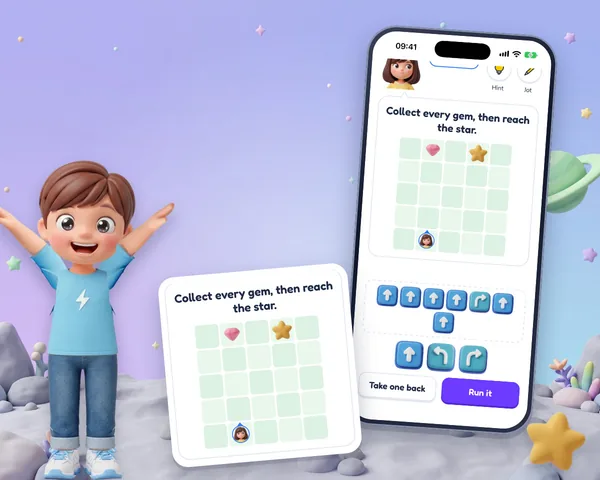
A step a year
- Years 1 to 3: picture blocks on a grid. Move forward, turn, repeat, and find the block that needs changing.
- Year 4: the same programs as written lines, then painting pictures on the grid with a pen.
- Year 5: variables, decisions with if and else, and checks such as “wall ahead”.
- Year 6: loops that run until something is true, functions, and reading and fixing other people's programs.
Any program that works is right
Each answer is checked by running it. A route to the star that is not the shortest still counts, and a slip is named by what the program did: it walked into a wall, missed a gem, or turned the wrong way. The companion walks the program a step at a time, so the child sees where it went astray.
Placed where they are
Coding is placed by stage, not by school year: a first test asks a couple of coding questions, and a child who has never coded starts at the beginning whatever their age. How the AI tutor plans.
Questions parents ask
What age can my child start coding?
From Year 1. The first lessons use picture blocks on a grid and need no reading or typing, and two of every twenty lessons in a plan are coding.
Does my child need to type?
No. Programs are built from blocks, then from whole lines and pieces on a code keyboard, so a name can never be misspelt and a child spends the time thinking, not typing.
Is it a real programming language?
Kiddo Code is a simple written language made for children, with the ideas of the real ones: commands, repeats, variables, decisions, loops and functions. Every answer is checked by running the program, so any program that works is right.